


nginx(ubuntu)+正向代理
一、nginx 安装
下载地址:http://nginx.org
上传到服务器并进行解压
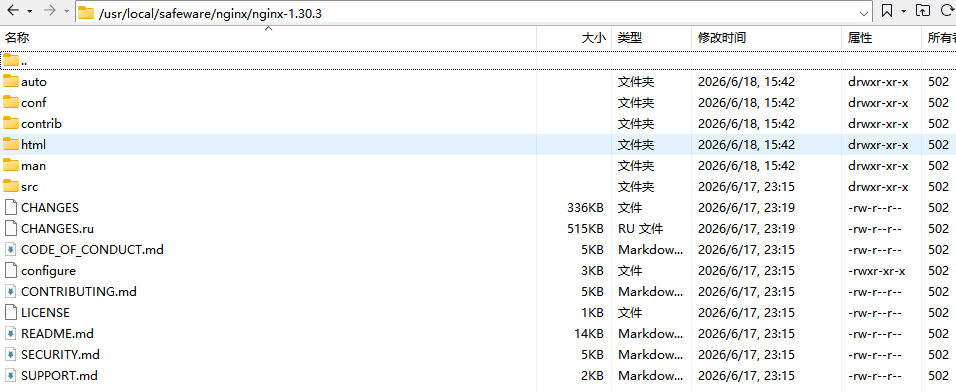
安装gcc相关的安装工具
sudo apt install gcc make libpcre3-dev zlib1g-dev openssl libssl-dev进入刚才解压的nginx目录,配置nginx 模块
./configure --prefix=/usr/local/nginx \
--with-http_ssl_module \
--with-http_realip_module \
--with-http_gzip_static_module \
--with-pcre \
--with-stream \
--with-stream_ssl_module \
--with-http_stub_status_module
注:遇到这个提示需要安装 libpcre3 libpcre3-dev ubuntu 安装失败 可以尝试 apt update
./configure: error: the HTTP rewrite module requires the PCRE library.
You can either disable the module by using --without-http_rewrite_module
option, or install the PCRE library into the system, or build the PCRE library
statically from the source with nginx by using --with-pcre=<path> option.
apt install libpcre3 libpcre3-dev ubuntu安装后重新执行模块配置就行
编译安装 需要多等几分钟
make && sudo make install启动nginx 默认安装后的位置:/usr/local/nginx
进入/usr/local/nginx/sbin 目录
执行./nginx 启动服务
./nginx访问80/8080端口测试
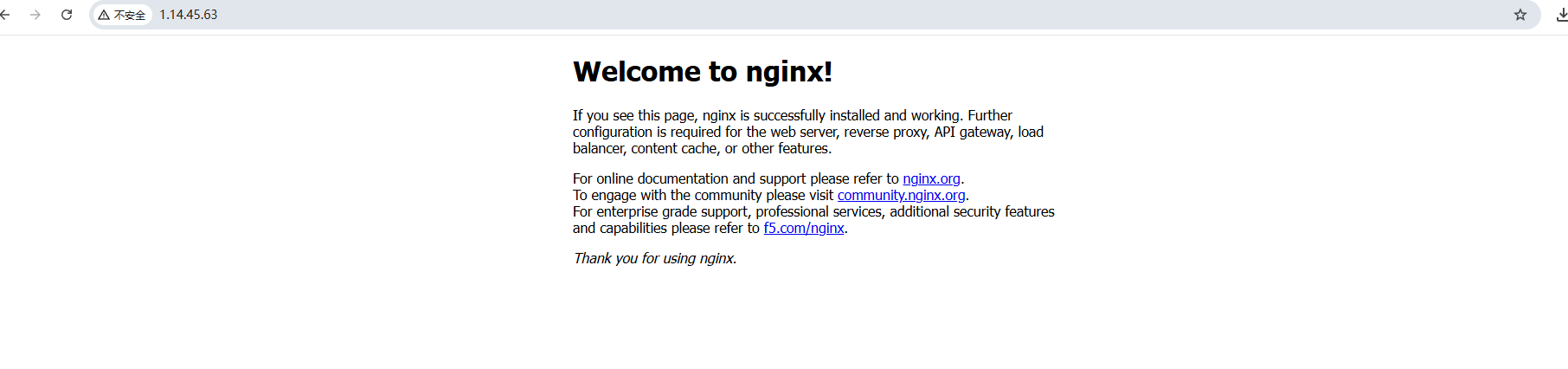 停止命令
./nginx -s stop
配置文件部分解析
#安全问题,建议用nobody,不要用root.
#user  nobody;

#worker数和服务器的cpu数相等是最为适宜
worker_processes  2;

#work绑定cpu(4 work绑定4cpu)
worker_cpu_affinity 0001 0010 0100 1000

#work绑定cpu (4 work绑定8cpu中的4个) 。
worker_cpu_affinity 0000001 00000010 00000100 00001000

#error_log path(存放路径) level(日志等级)
path表示日志路径,level表示日志等级,
#具体如下:
[ debug | info | notice | warn | error | crit ]
#从左至右,日志详细程度逐级递减,即debug最详细,crit最少,默认为crit。

#error_log  logs/error.log;
#error_log  logs/error.log  notice;
#error_log  logs/error.log  info;

#pid        logs/nginx.pid;

events {
    #这个值是表示每个worker进程所能建立连接的最大值,所以,一个nginx能建立的最大连接数,应该是worker_connections * worker_processes。
    #当然,这里说的是最大连接数,对于HTTP请求本地资源来说,能够支持的最大并发数量是worker_connections * worker_processes,
    #如果是支持http1.1的浏览器每次访问要占两个连接,
    #所以普通的静态访问最大并发数是: worker_connections * worker_processes /2,
    #而如果是HTTP作为反向代理来说,最大并发数量应该是worker_connections * worker_processes/4。
    #因为作为反向代理服务器,每个并发会建立与客户端的连接和与后端服务的连接,会占用两个连接。
    worker_connections  1024;
    #这个值是表示nginx要支持哪种多路io复用。
    #一般的Linux选择epoll, 如果是(*BSD)系列的Linux使用kquene。
    #windows版本的nginx不支持多路IO复用,这个值不用配。
    use epoll;

    # 当一个worker抢占到一个链接时,是否尽可能的让其获得更多的连接,默认是off 。
    multi_accept on;

    # 默认是on ,开启nginx的抢占锁机制。
    accept_mutex  on;
}


http {
    #当web服务器收到静态的资源文件请求时,依据请求文件的后缀名在服务器的MIME配置文件中找到对应的MIME Type,再根据MIME Type设置HTTP Response的Content-Type,然后浏览器根据Content-Type的值处理文件。

    include       mime.types;
    #如果 不能从mime.types找到映射的话,用以下作为默认值
    default_type  application/octet-stream;
     #日志位置
     access_log  logs/host.access.log  main;
     #一条典型的accesslog:
     #101.226.166.254 - - [21/Oct/2013:20:34:28 +0800] "GET /movie_cat.php?year=2013 HTTP/1.1" 200 5209 "http://www.baidu.com" "Mozilla/4.0 (compatible; MSIE 8.0; Windows NT 6.1; Trident/4.0; SLCC2; .NET CLR 2.0.50727; .NET CLR 3.5.30729; .NET CLR 3.0.30729; Media Center PC 6.0; MDDR; .NET4.0C; .NET4.0E; .NET CLR 1.1.4322; Tablet PC 2.0); 360Spider"
     #1)101.226.166.254:(用户IP)
     #2)[21/Oct/2013:20:34:28 +0800]:(访问时间)
     #3)GET:http请求方式,有GET和POST两种
     #4)/movie_cat.php?year=2013:当前访问的网页是动态网页,movie_cat.php即请求的后台接口,year=2013为具体接口的参数
     #5)200:服务状态,200表示正常,常见的还有,301永久重定向、4XX表示请求出错、5XX服务器内部错误
     #6)5209:传送字节数为5209,单位为byte
     #7)"http://www.baidu.com":refer:即当前页面的上一个网页
     #8)"Mozilla/4.0 (compatible; MSIE 8.0; Windows NT 6.1; Trident/4.0; SLCC2; .NET CLR 2.0.50727; .NET CLR 3.5.30729; #.NET CLR 3.0.30729; Media Center PC 6.0; MDDR; .NET4.0C; .NET4.0E; .NET CLR 1.1.4322; Tablet PC 2.0); 360Spider": agent字段:通常用来记录操作系统、浏览器版本、浏览器内核等信息

    log_format  main  '$remote_addr - $remote_user [$time_local] "$request" '
                       '$status $body_bytes_sent "$http_referer" '
                      '"$http_user_agent" "$http_x_forwarded_for"';
    #开启从磁盘直接到网络的文件传输,适用于有大文件上传下载的情况,提高IO效率。
    sendfile        on;

    #一个请求完成之后还要保持连接多久, 默认为0,表示完成请求后直接关闭连接。
    #keepalive_timeout  0;
    keepalive_timeout  65;

    #开启或者关闭gzip模块
    #gzip  on ;

    #设置允许压缩的页面最小字节数,页面字节数从header头中的Content-Length中进行获取。
    #gzip_min_lenth 1k;

    # gzip压缩比,1 压缩比最小处理速度最快,9 压缩比最大但处理最慢(传输快但比较消耗cpu)
    #gzip_comp_level 4;

    #匹配MIME类型进行压缩,(无论是否指定)"text/html"类型总是会被压缩的。
    #gzip_types types text/plain text/css application/json  application/x-javascript text/xml

    #动静分离
    #服务器端静态资源缓存,最大缓存到内存中的文件,不活跃期限
    open_file_cache max=655350 inactive=20s;

    #活跃期限内最少使用的次数,否则视为不活跃。
    open_file_cache_min_uses 2;

    #验证缓存是否活跃的时间间隔
    open_file_cache_valid 30s;

	#负载均衡
    upstream myserver{

    # 1、轮询(默认)
    # 每个请求按时间顺序逐一分配到不同的后端服务器,如果后端服务器down掉,能自动剔除。
    # 2、指定权重
    # 指定轮询几率,weight和访问比率成正比,用于后端服务器性能不均的情况。
    #3、IP绑定 ip_hash
    # 每个请求按访问ip的hash结果分配,这样每个访客固定访问一个后端服务器,可以解决session的问题。
    #4、备机方式 backup
    # 正常情况不访问设定为backup的备机,只有当所有非备机全都宕机的情况下,服务才会进备机。
    #5、fair(第三方)
    #按后端服务器的响应时间来分配请求,响应时间短的优先分配。
    #6、url_hash(第三方)
    #按访问url的hash结果来分配请求,使每个url定向到同一个后端服务器,后端服务器为缓存时比较有效。


      # ip_hash;
             server 192.168.161.132:8080 weight=1;
             server 192.168.161.132:8081 weight=1;

      #fair

      #hash $request_uri
      #hash_method crc32

      }


    server {
        #监听端口号
        listen       80;

        #服务名
        server_name  192.168.161.130;

        #字符集
        #charset utf-8;


	#location [=|~|~*|^~] /uri/ { … }
	# = 精确匹配
	# ~ 正则匹配,区分大小写
	# ~* 正则匹配,不区分大小写
	# ^~  关闭正则匹配

	#匹配原则:

	# 1、所有匹配分两个阶段,第一个叫普通匹配,第二个叫正则匹配。
	# 2、普通匹配,首先通过“=”来匹配完全精确的location
        #   2.1、 如果没有精确匹配到, 那么按照最大前缀匹配的原则,来匹配location
        #   2.2、 如果匹配到的location有^~,则以此location为匹配最终结果,如果没有那么会把匹配的结果暂存,继续进行正则匹配。
        # 3、正则匹配,依次从上到下匹配前缀是~或~*的location, 一旦匹配成功一次,则立刻以此location为准,不再向下继续进行正则匹配。
        # 4、如果正则匹配都不成功,则继续使用之前暂存的普通匹配成功的location.


        location / {   # 匹配任何查询,因为所有请求都已 / 开头。但是正则表达式规则和长的块规则将被优先和查询匹配。

	    #定义服务器的默认网站根目录位置
            root   html;

	    #默认访问首页索引文件的名称
	    index  index.html index.htm;

	    #反向代理路径
            proxy_pass http://myserver;

	    #反向代理的超时时间
            proxy_connect_timeout 10;

            proxy_redirect default;

         }

         location  /images/ {
	    root images ;
	 }

	 location ^~ /images/jpg/ {  # 匹配任何已 /images/jpg/ 开头的任何查询并且停止搜索。任何正则表达式将不会被测试。
	    root images/jpg/ ;


	 }
         location ~*.(gif|jpg|jpeg)$ {

	      #所有静态文件直接读取硬盘
              root pic ;

	      #expires定义用户浏览器缓存的时间为3天,如果静态页面不常更新,可以设置更长,这样可以节省带宽和缓解服务器的压力
              expires 3d; #缓存3天
         }


        #error_page  404              /404.html;

        # redirect server error pages to the static page /50x.html
        #
        error_page   500 502 503 504  /50x.html;
        location = /50x.html {
            root   html;
        }

    }
}
二、正向代理
配置nginx1.30 代理模块不支持,需要使用nginx1.26-1.27
正向代理模块补丁包 https://github.com/chobits/ngx_http_proxy_connect_module/releases/tag/v0.0.7
ngx_http_proxy_connect_module-master.zip 补丁
进入nginx解压目录后加载模块
patch -p1 < /usr/local/safeware/nginx/ngx_http_proxy_connect_module/patch/proxy_connect_rewrite_102101.patch先配置模块后在添加模块
./configure --add-module=/usr/local/safeware/nginx/ngx_http_proxy_connect_module --prefix=/usr/local/nginx \
--with-http_ssl_module \
--with-http_realip_module \
--with-http_gzip_static_module \
--with-pcre \
--with-stream \
--with-stream_ssl_module \
--with-http_stub_status_module
编译安装
make && make install启动nginx 目录同上/usr/local/nginx
进入/usr/local/nginx/sbin 目录
执行./nginx 启动服务
代理配置 nginx.conf 配置的代理端口为7890
#user  nobody;
worker_processes  1;

#error_log  logs/error.log;
#error_log  logs/error.log  notice;
#error_log  logs/error.log  info;

#pid        logs/nginx.pid;


events {
    worker_connections  1024;
}


http {
    include       mime.types;
    default_type  application/octet-stream;

    #log_format  main  '$remote_addr - $remote_user [$time_local] "$request" '
    #                  '$status $body_bytes_sent "$http_referer" '
    #                  '"$http_user_agent" "$http_x_forwarded_for"';

    #access_log  logs/access.log  main;

    sendfile        on;
    #tcp_nopush     on;

    #keepalive_timeout  0;
    keepalive_timeout  65;

    #gzip  on;

    server {
        listen       80;
        server_name  localhost;

        #charset koi8-r;

        #access_log  logs/host.access.log  main;

        location / {
            root   html;
            index  index.html index.htm;
        }

        #error_page  404              /404.html;

        # redirect server error pages to the static page /50x.html
        #
        error_page   500 502 503 504  /50x.html;
        location = /50x.html {
            root   html;
        }

        # proxy the PHP scripts to Apache listening on 127.0.0.1:80
        #
        #location ~ \.php$ {
        #    proxy_pass   http://127.0.0.1;
        #}

        # pass the PHP scripts to FastCGI server listening on 127.0.0.1:9000
        #
        #location ~ \.php$ {
        #    root           html;
        #    fastcgi_pass   127.0.0.1:9000;
        #    fastcgi_index  index.php;
        #    fastcgi_param  SCRIPT_FILENAME  /scripts$fastcgi_script_name;
        #    include        fastcgi_params;
        #}

        # deny access to .htaccess files, if Apache's document root
        # concurs with nginx's one
        #
        #location ~ /\.ht {
        #    deny  all;
        #}
    }
	#正向代理
	server {
    listen 7890;  # Nginx 监听端口,客户端需要将代理服务器设置为 http://<nginx_ip>:8080
#    server_name _;  # 泛指所有域名和IP请求

    # DNS 解析器,用于解析客户端请求中的目标域名
    resolver 114.114.114.114 valid=300s;
    resolver_timeout 5s;

    #以下5行为新增模块后,为支持Https而增加的内容
    proxy_connect;
    proxy_connect_allow all;  # 允许代理所有主机
    proxy_connect_connect_timeout 10s;  # 连接到目标服务器的超时时间
    proxy_connect_read_timeout 10s;     # 读取目标服务器响应的超时时间
    proxy_connect_send_timeout 10s;     # 发送请求给目标服务器的超时时间


    # HTTP 请求代理配置
    location / {
        proxy_pass http://$http_host$request_uri;  # 代理请求并转发给客户端请求的目标服务器
        proxy_set_header Host $host;               # 将原始请求中的 Host 保留,传递给目标服务器
        proxy_set_header X-Real-IP $remote_addr;   # 设置客户端真实 IP,传递给目标服务器
        proxy_set_header X-Forwarded-For $proxy_add_x_forwarded_for;  # 记录客户端 IP 和代理链信息
        proxy_set_header X-Forwarded-Proto $scheme; # 传递请求协议(HTTP)

        # 设置超时配置
        proxy_connect_timeout 10s;   # 连接到目标服务器的超时时间
        proxy_read_timeout 60s;      # 读取目标服务器响应的超时时间
        proxy_send_timeout 60s;      # 向目标服务器发送请求的超时时间

        # 关闭缓存,实时转发请求和响应
        proxy_buffering off;
    }

    # 自定义错误页面,捕获代理失败的情况
    error_page 500 502 503 504 /50x.html;
    location = /50x.html {
        root /usr/share/nginx/html;  # 错误页面存储位置
    }
}


    # another virtual host using mix of IP-, name-, and port-based configuration
    #
    #server {
    #    listen       8000;
    #    listen       somename:8080;
    #    server_name  somename  alias  another.alias;

    #    location / {
    #        root   html;
    #        index  index.html index.htm;
    #    }
    #}


    # HTTPS server
    #
    #server {
    #    listen       443 ssl;
    #    server_name  localhost;

    #    ssl_certificate      cert.pem;
    #    ssl_certificate_key  cert.key;

    #    ssl_session_cache    shared:SSL:1m;
    #    ssl_session_timeout  5m;

    #    ssl_ciphers  HIGH:!aNULL:!MD5;
    #    ssl_prefer_server_ciphers  on;

    #    location / {
    #        root   html;
    #        index  index.html index.htm;
    #    }
    #}

}